️ CodeLens — Diagram Preview (v1.48.0)
Install REslava.Result Extensions from the VS Code Marketplace to get a ▶ Open diagram preview CodeLens above every [ResultFlow]-annotated method — always visible, no cursor needed.
[ResultFlow(MaxDepth = 2)]
▶ Open diagram preview          ← click to open a dedicated diagram panel
public Result<Order> PlaceOrder(...)
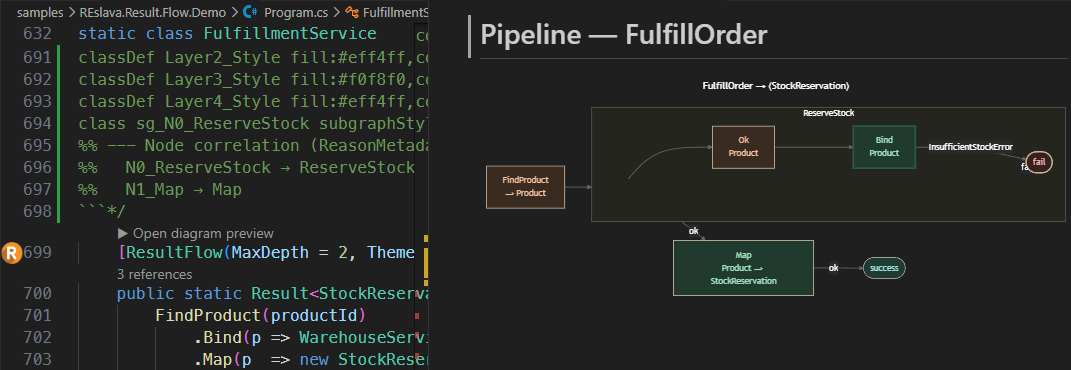
Upgraded to WebviewPanel renderer in v1.49.0 — bundled Mermaid v10.9.5, fully offline, no external dependencies.
Panel features (v1.49.0 / VSIX v1.1.0):
- Node-click navigation — click any diagram node to jump to that exact line in your source (requires
ResultFlowLinkMode=vscode— see §3.9) - Source button — view and copy the raw Mermaid DSL
- Legend button — node colour guide and interaction hints
- SVG / PNG buttons — export the diagram to disk; PNG at 2× resolution for high-DPI screens
- Light and dark background follows your
ResultFlowDefaultThemeMSBuild property
To enable node-click navigation, add to your .csproj or Directory.Build.props:
<PropertyGroup>
  <ResultFlowLinkMode>vscode</ResultFlowLinkMode>
</PropertyGroup>
How it works — 4-step fallback chain:
- Looks for
*_Flows.g.csin the workspace → extracts the Mermaid constant → opens preview ✅ - If the project hasn't been built yet: automatically runs the Insert diagram as comment code action (Roslyn must be warm) → extracts diagram from the inserted comment → opens preview ✅
- If a
/* ```mermaid...``` */comment already exists above the method: extracts it directly → opens preview ✅ - Otherwise: shows an information message — "Diagram not ready yet — try again in a moment"
The VSIX is a separate install from the NuGet packages — install both independently:
- NuGet: dotnet add package REslava.Result.Flow
- VS Code Marketplace: REslava.Result Extensions
The VSIX does not ship inside the NuGet package.
Ctrl+.lightbulb keeps the existing Insert / Refresh diagram actions (REF002) unchanged.